
Most of the “prompt engineering” advice floating around is already out of date.
Not wrong, exactly. Just aimed at a version of these models that doesn’t really exist anymore. Back in 2022 you had to coax a model into reasoning.
You had to beg. Now?
GPT-5.5, Claude, Gemini, DeepSeek-R1. A lot of them reason on their own before they answer. So the game shifted. Some old tricks became reflexes the model already has. Others got more important, because the bottleneck moved from “can it think” to “did I tell it the right thing to think about.”
I learned this the hard way on a project classifying ServiceNow tickets. The model hallucinated on what felt like every other ticket: inventing categories, confidently filing things under labels that didn’t exist.
I reworded the prompt every way I could think of. Nothing worked. What finally fixed it wasn’t clever phrasing. It was context: a handful of real labeled examples (few-shot) plus retrieval (RAG), so the model classified against our actual categories instead of its own imagination.
The hallucinations stopped. Then, once it was working, we layered chain-of-thought on top, making it reason through which category fit before committing, and that pushed it from passable to something we could trust. Three techniques, stacked, each one fixing what the last couldn’t.
So this isn’t another listicle of magic words. It’s the 12 techniques I actually reach for, what each one is really doing under the hood, and the part most guides skip: when not to bother. Each one comes with a quick before-and-after so you can see the response actually change. And at the end, two ways to decide which one to use for a given job. Let’s get into it.
First, what a prompt actually is
Quick gut-check before the techniques, because it matters. A prompt is just the input you hand the model. Instructions, a question, some examples, context. Whatever you put in the box. And the quality of what comes out is tied, pretty directly, to the quality of what you put in. Garbage in, confident garbage out.
That’s the whole reason this skill exists. You’re not casting spells. You’re communicating with something that takes you very literally and has no idea what’s in your head. Keep that picture in mind and half of these techniques will feel obvious.
The shift you should know about before any technique
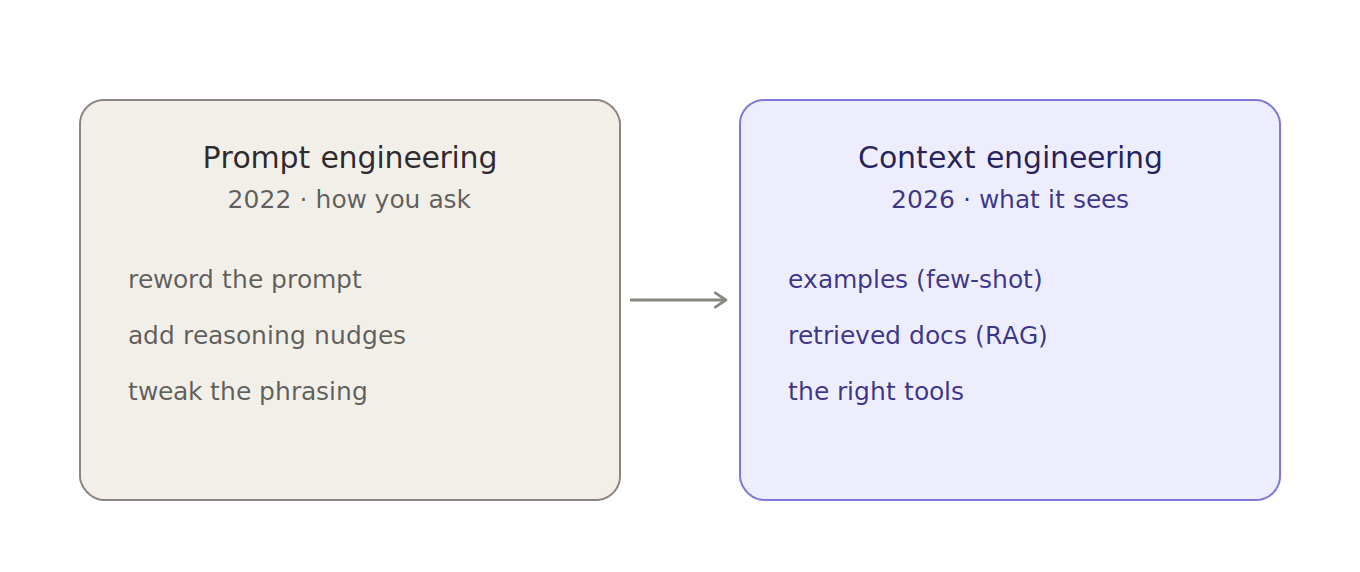
What actually changed in the last year is something almost no older guide will tell you. The frontier has quietly moved from prompt engineering (how you phrase the request) to what people now call context engineering (what information you put in front of the model in the first place).
Andrej Karpathy and a pile of 2026 reports have been hammering this point: as models got better at reasoning on their own, the bottleneck stopped being your wording and became the stuff surrounding it. The data, the examples, the documents, the tools it can reach.
The blunt version: a brilliant model with bad context loses to a mediocre model with great context, every single time. My ServiceNow story up top is the whole lesson in miniature. The fix was never a better sentence. It was better context.
So yes, learn the techniques below, they still earn their place. But notice as you read that the ones growing in importance (few-shot, RAG, structured output, giving it tools) are all really about context, not clever phrasing. The techniques fading out are the ones that were just tricks to squeeze reasoning out of a model that couldn’t reason yet. Keep that lens on the whole list.
1. Zero-shot prompting
This is the one you’re already doing. You describe the task, you give zero examples, you let the model run on what it already knows.
Prompt: Summarize this email in two sentences. [email]
Response: The client wants the launch pushed to March and is worried about the QA timeline. They’ve asked for a revised plan by Friday.
Zero-shot has been around since the early GPT days (Radford and team showed models could handle brand-new tasks from a plain description back in 2019). And honestly, for simple, well-defined stuff, it’s all you need. Don’t overthink it. If “translate this to French” works, you don’t need a five-paragraph mega-prompt with a persona and a chain of thought. You’re just adding noise.
Use it when: the task is clear and you’d be able to do it yourself in one sentence of instructions.
2. Few-shot prompting
Now the task gets fuzzier. Maybe you want a very specific output format, or a tone the model keeps drifting away from. Instead of describing what you want, show it. Give two or three examples, then the real input.
This goes back to the original GPT-3 paper (Brown et al., 2020), the one literally titled “Language Models are Few-Shot Learners.” The idea stuck because it works. Three good examples beat a page of instructions almost every time, especially for structured output. It was also half the fix for my hallucinating ticket classifier: once the model could see real labeled examples, it stopped guessing at the format.
A quick version. Say you’re turning support messages into tickets:
Prompt:
Input: “The app crashed when I uploaded a 5MB photo.”
Output: { “issue”: “crash on upload”, “severity”: “high” }
Input: “Checkout takes 30 seconds on mobile.”
Output:
Feed that in, and the model hands back the exact shape you never actually described:
Response: { “issue”: “slow checkout on mobile”, “severity”: “medium” }
No schema, no instructions about JSON, no “please use these fields.” It copied the pattern. That’s the magic: you taught it the format by showing two examples instead of writing a spec.
One catch, and one update for 2026: more examples is not better. The sweet spot is two or three. The original paper tested up to a hundred, but the gains flatten fast after the first few, and every extra example is tokens you’re paying for. Pick two or three really good ones over ten generic ones. And watch the examples themselves: pick weird or biased ones and the model copies the weirdness.
3. Role and structure prompting
Give the model a role and a shape to fill. That one move changes the vocabulary, the depth, and the things it bothers to flag. Watch the same question with and without it:
“Is this code safe?” → “Looks fine, just make sure you validate user input.”
“You are a senior security engineer. Review this code for vulnerabilities.” → “Line 12 drops user input straight into the SQL string, that’s an injection hole. Parameterize it. And rate-limit the login route while you’re in there.”
Same code, same model. One framing gets you a shrug; the other gets you specifics.
The version that’s stuck around in 2026 is the structured-prompt framework: role, task, context, format. Tell it who to be, what to do, what it needs to know, and how to hand it back. It sounds bureaucratic. It isn’t. It’s just removing the four things the model would otherwise have to guess. One line earns its keep more than any other:
Return only the rewritten text, no commentary.
That kills the “Sure! Here’s your rewritten paragraph:” preamble. Small thing. Adds up.
4. Chain-of-thought (CoT)
This is the famous one. Instead of letting the model blurt an answer, you ask it to reason through the steps first.
The research behind it is almost hard to believe. Wei and colleagues at Google (2022) showed that with just eight worked examples of step-by-step reasoning, a big model (Google’s PaLM) could beat a fine-tuned GPT-3 on the GSM8K math benchmark. Eight examples. Not a training run. Not a custom dataset. Eight.
You can watch it work on a single problem. “A store takes 25% off, then another 10% off a $200 jacket. What’s the final price?”
Asked straight: “$130.” (It mashed the two discounts into a flat 35% off. Wrong.)
With “work through each discount step by step”: Start at $200. Take 25% off → $150. Then 10% off $150 → $135. Final price: $135.
Same model, same question. The instruction didn’t make it smarter. It made it slow down, and slowing down is where the right answer lives. The intuition: a hard problem answered in one jump is a guess. Worked out in steps, the model has room to actually compute, and you have room to see where it went wrong.
This is the layer that rescued my ticket classifier. Few-shot and RAG got it working, but the borderline tickets, the ones that could plausibly fit two categories, still tripped it up. Adding “reason through which category fits before you answer” was what pushed it from passable to reliable. That is the textbook 2026 use for CoT: not your first move, but the thing you reach for when the basics are solid and the decision is multi-step, the way a borderline ticket can sit between two categories at once.
Now the footnote almost nobody adds, and it cuts both ways. On reasoning-native models (DeepSeek-R1, the GPT-5 series, the newer thinking models), the step-by-step work is already baked in. Wharton’s Prompting Science Report 2 (Meincke, Mollick et al., 2025) tested exactly this and found explicit CoT gives those models only marginal gains, while adding 20 to 80 percent to response time. You’re telling them to do something they already do, and paying for it. But on a plain, non-reasoning model (a GPT-4o-class model, or a small local one) asking for steps still buys you a real lift on logic-heavy tasks. So the rule for 2026 is clean: reasoning model, skip it; plain model, keep it.
5. Zero-shot chain-of-thought
The lazy, beautiful cousin of #4. You don’t write any reasoning examples. You just append five words: “Let’s think step by step.”
The classic demo is the bat-and-ball question: “A bat and a ball cost $1.10. The bat costs $1 more than the ball. How much is the ball?”
Bare: “10 cents.” (The answer that feels obviously right. It’s wrong.)
With the five words: Call the ball x. The bat is x + $1, so x + (x + $1) = $1.10, which gives 2x = $0.10, so x = $0.05. The ball is five cents.
Nothing changed but those five words. That trigger comes from Kojima et al. (2022), and it’s the highest return-on-effort move in this whole list for older models.
6. Self-consistency
This one’s clever. Run the same chain-of-thought prompt several times, let the model take different reasoning paths, then take the majority answer. Like asking five people and going with the consensus instead of trusting whoever spoke first.
Five runs of a gnarly probability question: 1/3 · 1/2 · 1/3 · 1/3 · 2/3
Your answer: 1/3, because four of the five paths landed there.
That’s far more trustworthy than whatever it happened to say on attempt one. Wang et al. (2022) showed this layered on top of chain-of-thought boosted GSM8K accuracy by nearly 18 percent. That’s not a rounding error. The cost is obvious, though: you’re paying for five to ten answers instead of one. So save it for the high-stakes stuff: the financial calc, the medical-adjacent question, the thing where being wrong is expensive. Not for “write me a tweet.”
7. Tree of thoughts
Chain-of-thought walks one path. Tree of thoughts explores several, evaluates them, backtracks when one’s a dead end, and picks the best. It’s how you’d actually solve a puzzle. Try a branch, hit a wall, back up, try another.
Chain-of-thought: commits to one line of reasoning and rides it to the end, right or wrong.
Tree of thoughts: “Path A stalls at step 3. Abandon it. Path B looks promising, keep going. Path C is a dead end.” Then it returns the path that actually worked.
The numbers are almost funny. Yao et al. (2023) tested it on the “Game of 24” math puzzle. Plain chain-of-thought solved 4 percent. Tree of thoughts solved 74 percent. Same model. Different search strategy. So why isn’t everyone using it constantly? Because it can cost 10 to 50 times the tokens. It’s a sledgehammer: great for planning and complex search, complete overkill for the other 95 percent of what you do.
8. ReAct (reason + act)
This is where prompting stops being a one-shot and becomes a loop. ReAct, short for Reasoning + Acting, lets the model think, then take an action (search the web, run a calculation, hit an API), look at what came back, and think again.
Question: “Who is the current CEO of the company that makes the Claude models, and how long have they been in the role?”
The loop: Thought: I need the maker of Claude. Action: search “company behind Claude AI.” Observation: Anthropic. Thought: now I need their CEO and start date. Action: search “Anthropic CEO.” Observation: [result]. Answer: assembled from what it actually found, not from memory.
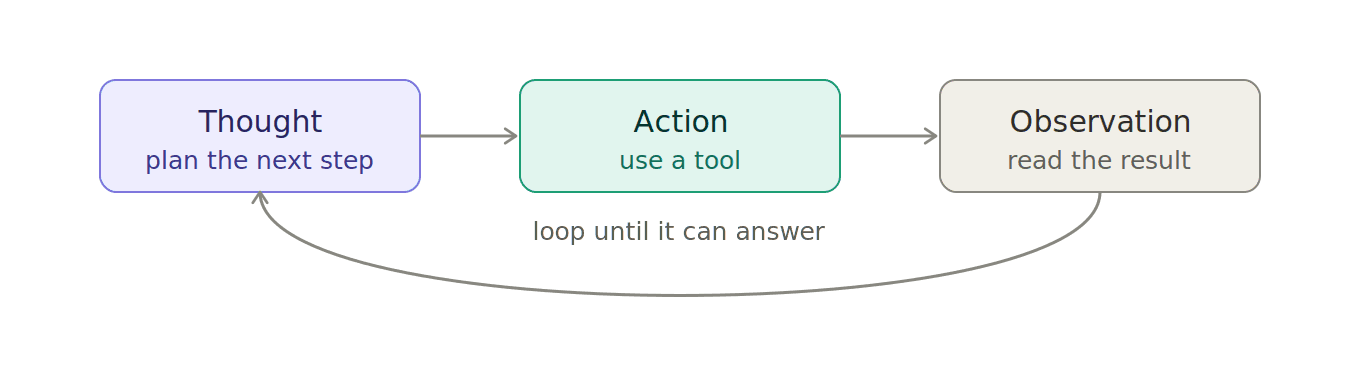
If you’ve read my LangChain agents guide, you’ve met this one already. It’s the backbone of basically every AI agent worth the name (Yao et al., 2022), and the headline finding still holds: ReAct combined with chain-of-thought and self-consistency beat every single technique used alone on knowledge-heavy tasks. The payoff? It lets a cheaper, faster model punch above its weight, because you’re giving it tools instead of asking it to know everything. The model doesn’t need to remember today’s weather. It just needs to know to go look it up.
One thing to plan for once those tools do real work: a tool call that times out usually gets retried, and a retried “send email” or “issue refund” can run twice. The fix is the one payment APIs use, an idempotency key on every tool that changes something.
9. Prompt chaining (decompose the problem)
Stop trying to do everything in one giant prompt. Break the job into a chain of smaller prompts, where the output of one feeds the next.
One giant prompt: “Write a 1,500-word blog post on X with an intro, five sections, and a conclusion.” → a flat, samey wall of text.
Chained: Prompt 1 → outline. Prompt 2 → draft each section from that outline. Prompt 3 → tighten and cut the fluff. → noticeably sharper, because each step was small enough to nail.
This is the same spirit as “least-to-most” prompting: solve the easy sub-problems first and build up. It’s also just good engineering. Smaller steps are easier to debug. When something goes wrong, you know exactly which link in the chain broke.
10. Retrieval-augmented generation (RAG)
Models hallucinate. They make up citations, invent dates, state false things with total confidence. I know this one in my bones after the ticket project: the model wasn’t broken, it just had nothing real to go on. RAG is the fix. Before the model answers, you fetch the relevant facts (from your docs, a database, a search) and stuff them right into the prompt.
Without RAG: “Your refund window is 30 days.” (Plausible. Also completely invented.)
With RAG: [your actual policy doc is pasted into the prompt] → “Your refund window is 14 days for opened items, 30 for unopened, per section 4 of the policy.”
This is the technique that matters most in 2026, and it’s no accident that it’s pure context engineering. The prompting half is one line everyone forgets: “Use the context below. If the answer isn’t there, say so.” That single instruction is what stops the confident lying. If you’re building anything on top of your own data, a docs bot, an internal assistant, a ticket classifier, this isn’t optional. It’s the whole thing.
11. Self-refine (let it critique itself)
Get a first draft, then ask the model to critique its own answer and improve it. “Here’s your response. Find three weaknesses and rewrite it to fix them.”
First draft: “Innovative solutions for the modern team.”
After the self-critique: “Ship your release notes in one click, straight from your commits.”
The second one actually says what the product does. The model knew how to get there. It just needed to be told to look again. It feels too good to work, but a model is often a better editor of its output than it was an author of it: the first pass is the brain dump, the second is where it catches the sloppy logic and the missing edge case. Don’t loop it forever, though. Two or three rounds, then you hit diminishing returns and it starts fiddling with commas.
12. Meta-prompting
The technique for when you’re stuck. Can’t figure out how to phrase something? Ask the model to write the prompt for you.
You: “I want to do X. Write me the best prompt to get that result, and explain your choices.”
It hands back: a tightened prompt with a role, clear constraints, and a specified output format, plus a line on why each piece is there.
It sounds like cheating. I think it’s the most underrated skill on this list. The model knows what it responds well to better than you do, so turning it into your prompt-writing partner shortcuts a ton of trial and error. Use what it gives you, then tweak.
So how do you actually pick?
Don’t memorize all twelve and agonize. There are two ways to decide, and you’ll mostly use the first.
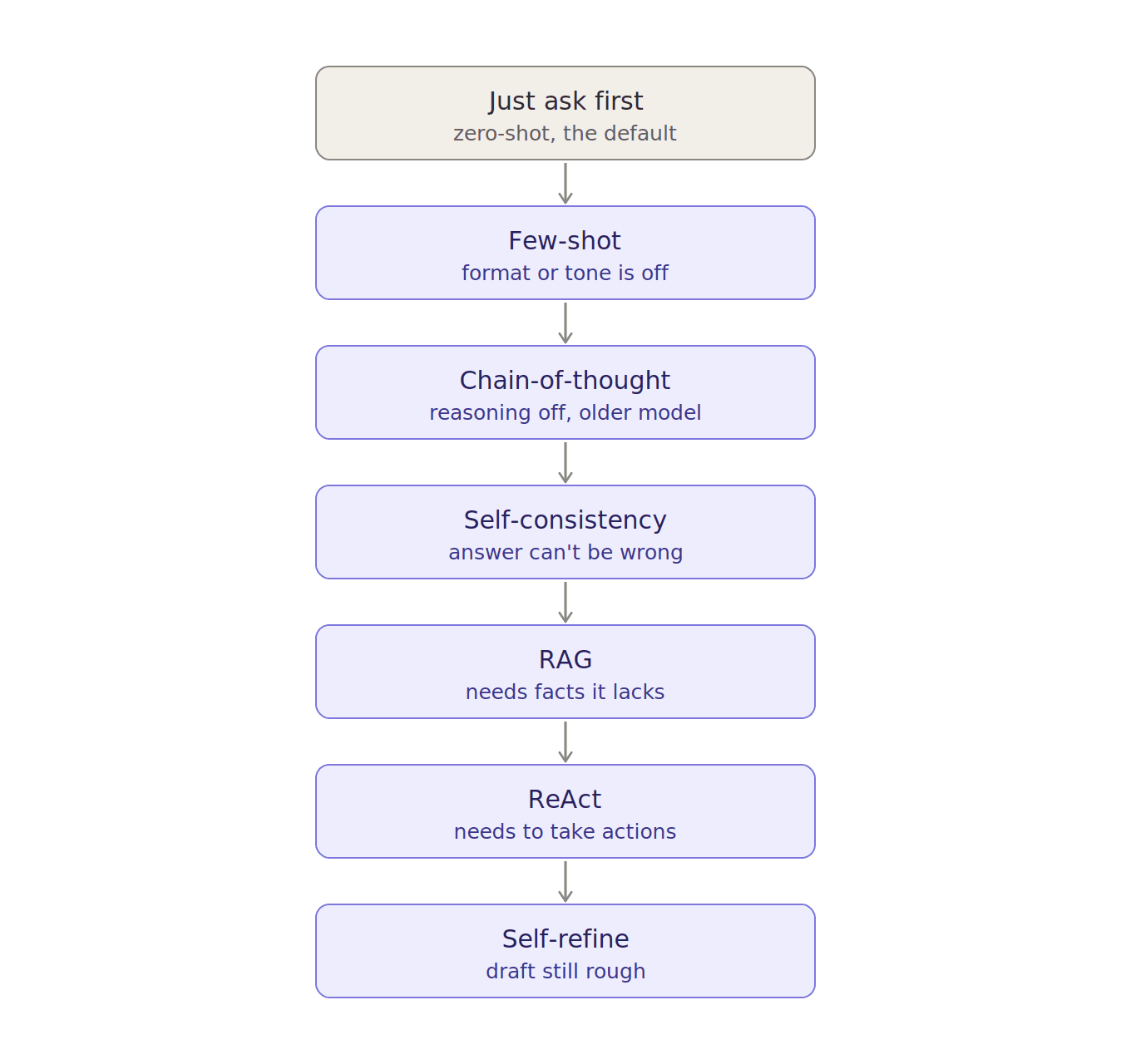
One: start simple and escalate only when you hit a wall. Almost every task is solved by step one or two. Reaching for tree-of-thoughts on a “summarize this email” job is how you burn tokens and time for nothing. My ticket classifier walked right down this ladder without me planning it: zero-shot failed, few-shot plus RAG fixed the hallucinations, then chain-of-thought cleaned up the edge cases.
Start: zero-shot. Just ask.
Format or tone off? → few-shot (show it two or three examples).
Reasoning wrong on an older model? → add “let’s think step by step.”
Answer absolutely cannot be wrong? → self-consistency (run it a few times, take the majority).
Needs facts it doesn’t have? → RAG (hand it the documents).
Needs to actually do things? → a ReAct loop with tools.
Draft still rough? → self-refine (make it critique itself).
Two: pick by the kind of work. If you already know the shape of the job, jump straight to the right tool.
| If you’re… | Reach for |
|---|---|
| Writing code or debugging | Role (“senior engineer”) + CoT on weaker models + self-refine |
| Drafting long-form writing | Prompt chaining (outline → draft → tighten), few-shot for voice |
| Answering from your own docs | RAG, every time, plus “say if it’s not in the context” |
| Classifying or extracting data | Few-shot with 2-3 examples + RAG + a strict output format |
| Cracking hard math or logic | Self-consistency, or tree-of-thoughts if it really branches |
| Building an agent that acts | ReAct + chaining, with RAG for what it needs to know |
| Totally stuck on phrasing | Meta-prompting: make the model write the prompt |
And here’s the full list at a glance. Screenshot it, that’s what it’s for.
| Technique | Reach for it when… | The catch |
|---|---|---|
| Zero-shot | The task is simple and clear | Falls apart on anything subtle or formatted |
| Few-shot | You need a specific format or tone | Bad examples teach bad habits |
| Role + structure | Pretty much every serious prompt | Costs you nothing, so just do it |
| Chain-of-thought | Reasoning on older or smaller models | Near-useless on reasoning models, and slower |
| Zero-shot CoT | You want reasoning but have no examples | Same caveat as CoT on newer models |
| Self-consistency | A high-stakes answer you have to trust | 5 to 10x the cost |
| Tree of thoughts | Puzzles, planning, lots of branches | 10 to 50x the tokens; overkill for most tasks |
| ReAct | The model needs live data or tools | More moving parts to wire up |
| Prompt chaining | A big, multi-stage job | More steps to manage and debug |
| RAG | Answering from your own documents | Needs retrieval plumbing behind it |
| Self-refine | A draft that needs polishing | Diminishing returns after 2 to 3 passes |
| Meta-prompting | You’re stuck on how to even phrase it | Still tweak whatever it hands back |
And the real secret, the one the research keeps confirming and my ticket project proved the hard way: the best results almost never come from one technique. They come from stacking. ReAct plus chain-of-thought plus self-consistency. Few-shot plus RAG plus a clear role. The pros aren’t picking a favorite. They’re combining.
Where this is all heading
One more time on the thing that’s easy to miss: as models get better at thinking on their own, some of this list quietly fades. Chain-of-thought on a reasoning model is already starting to feel like reminding a chess grandmaster to “consider their moves.” The techniques that grow in importance are the ones about feeding the model the right context: RAG, good examples, clear structure, the right tools. That’s exactly the prompt-engineering-to-context-engineering shift from the top of this post, and it’s where the whole field is going. Less coaxing the model to think. More making sure it’s thinking about the right thing.
And if you’re building real systems rather than just chatting, there’s a frontier worth knowing about: letting software optimize the prompt for you. Tools like Stanford’s DSPy treat prompts as code you compile against a metric instead of hand-tuning them, and they routinely beat hand-written prompts once you’ve got more than a handful of LLM calls to juggle. That’s a deeper rabbit hole than one post can cover, but it’s the clearest sign of where things are going: “prompt engineering” is quietly turning into plain engineering.
Over to you: which of these do you actually use day to day, and which one did I rate too high or too low? I want to know. Drop it in the comments. I’m still figuring out where some of these land in 2026 myself.