
Every API has a rate limit. Either you chose it, or your database chose it for you at the worst possible moment.
Updated 14 October 2026 · Tested with Python 3.12, redis-py 8.1.0, Redis 8.10.2
Part 2 of the Reliable Python services series · ← Idempotency keys
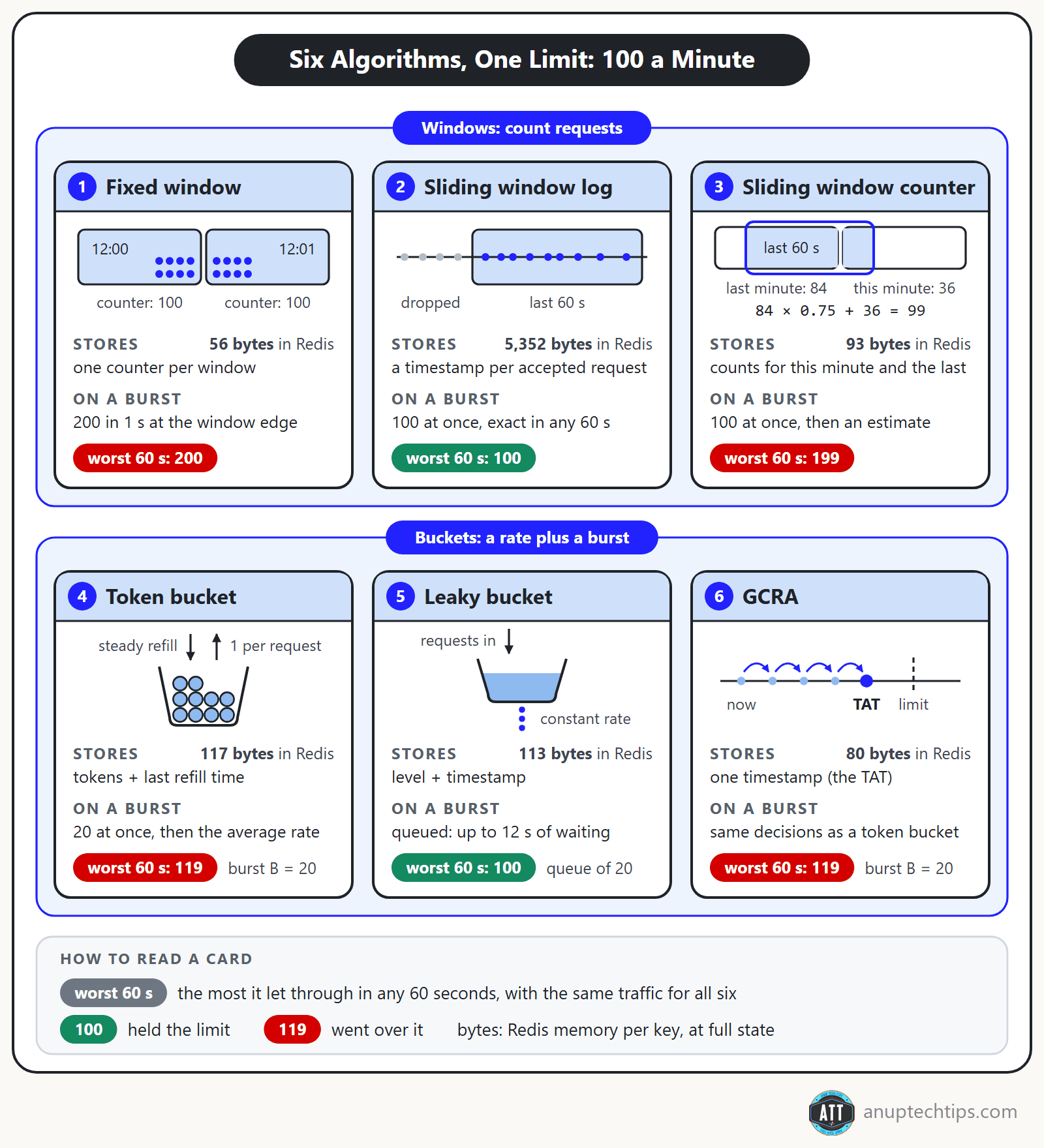
Rate limiting algorithms decide whether a client’s next request goes through now, and token bucket vs sliding window is the choice most APIs end up making: a token bucket allows a burst of up to B requests and then an average rate, while a sliding window caps how many requests land in any rolling window.
Teams often add one after an incident, copying a fixed window with a race hiding in it. So this post runs six algorithms through one simulator, same limit (100 a minute), same traffic. All but the sliding log (and a queue, which pays in waiting) let more than 100 through in some 60-second span. Pick the overshoot you can explain.
The short answer
- Bursty, user-facing API? A token bucket with a burst B chosen on purpose. With B = 20, the worst minute held 119.
- Must never pass 100 a minute? A sliding window log. Nothing in the sim passed more than 100.
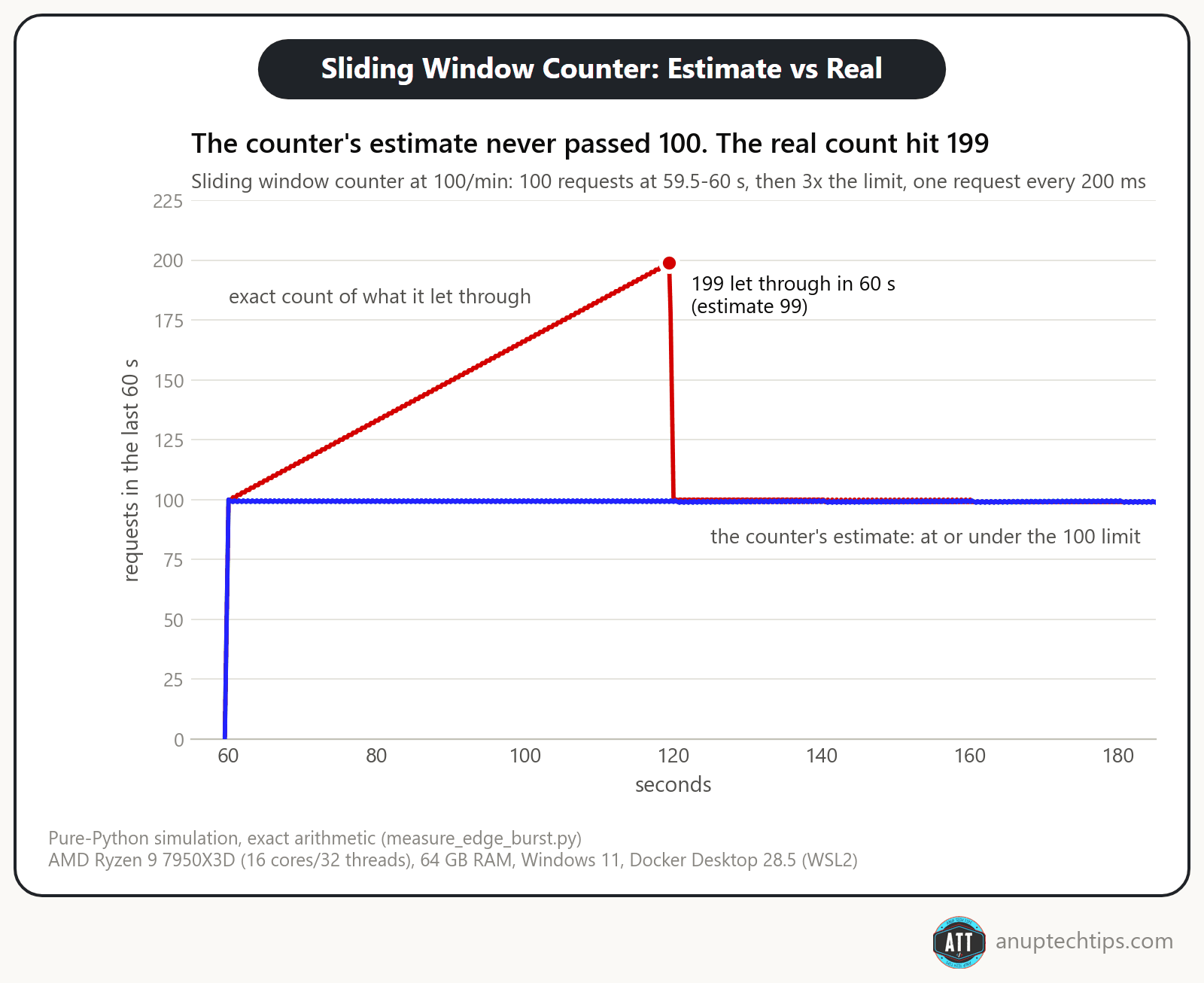
- Millions of keys? The sliding window counter is the cheap approximation, but not a hard cap: one pattern got 199 through in a minute.
What does a limit added in a hurry look like? On 1 July 2023, Twitter (now X) limited unverified accounts to reading 600 posts a day and verified ones to 6,000, citing “extreme levels of data scraping”. The same weekend, a developer caught Twitter’s own web app asking for content that never arrived, about 10 times a second (The Register). A limit switched on for everyone at once, and a client that never stops retrying: I’ll come back to both.
Why rate limit at all?
Because one client’s burst, retry loop or scraper can take a shared service down for everyone. A limit does four jobs, and the job picks the algorithm.
- Abuse. Credential stuffing, scraping, enumerating IDs. Anything easier with a million attempts.
- Fairness. One noisy tenant shouldn’t eat the capacity everyone else pays for.
- Cost. If each request triggers a paid call (an LLM, an SMS), an unlimited endpoint is an unlimited bill.
- Protecting dependencies. Your database has a real ceiling. Hit it on your terms, with a clean error.
The last is the most underrated: many limits stop well-meaning clients, like a retry loop or a buggy mobile release. That’s why this post follows idempotency keys in the Reliable Python services series: part 1 made a retry safe, and a limit stops one client from retrying too often.
Six rate limiting algorithms, one limit: 100 requests a minute
All six enforce the same limit: 100 requests a minute. To see where each one bends, the simulator (linked at the end) sends them more traffic than the limit allows. First comes a burst of 200 requests in one second, timed across a minute boundary: 100 in the last half second of 12:00 and 100 in the first half second of 12:01. Then it sends a steady 300 a minute for four minutes. A perfect limiter lets no more than 100 through in any 60-second span. The arithmetic is exact, so reruns match.
Fixed window
The simplest of the six. A fixed window counter splits time into calendar minutes (12:00, 12:01, 12:02 and so on) and keeps one counter per client for the current minute. Each request adds 1. Once the counter reaches 100, the rest of that minute’s requests are rejected. When the next minute starts, the counter goes back to 0.
It’s cheap, one number per client, and easy to reason about. The catch is that reset. The window only knows calendar minutes, not “the last 60 seconds”. So a client can send 100 requests at 12:00:59.5, wait half a second for the counter to reset, and send 100 more at 12:01:00. Each minute saw exactly 100, so all 200 got through, in one second.
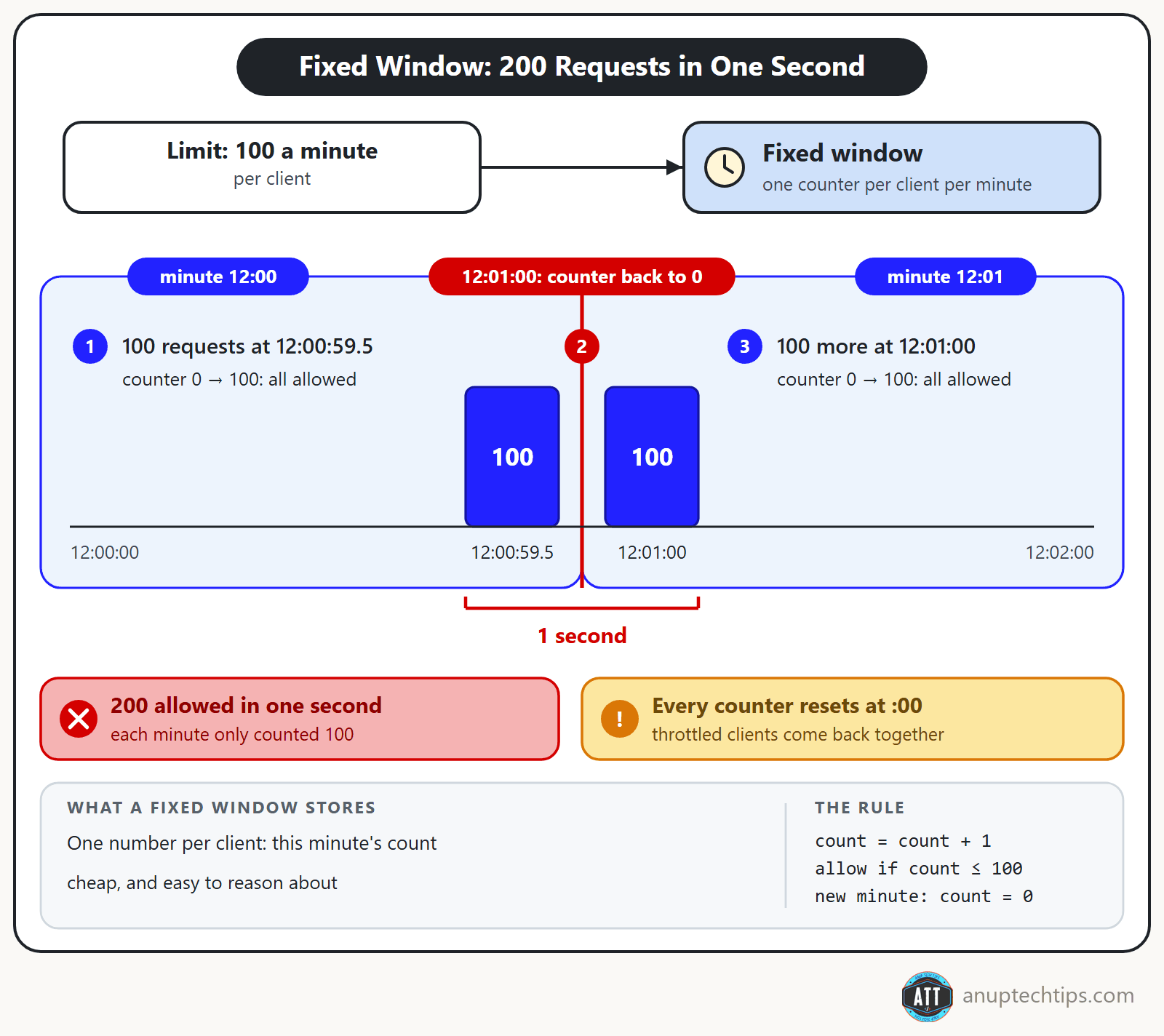
There’s a smaller problem too: every client’s counter resets at the same moment, so throttled clients all come back at :00 together. A fixed window is fine for calendar quotas, like 1,000 calls a day, where a burst at the edge doesn’t hurt. For anything fragile, use one of the next five.
Sliding window log
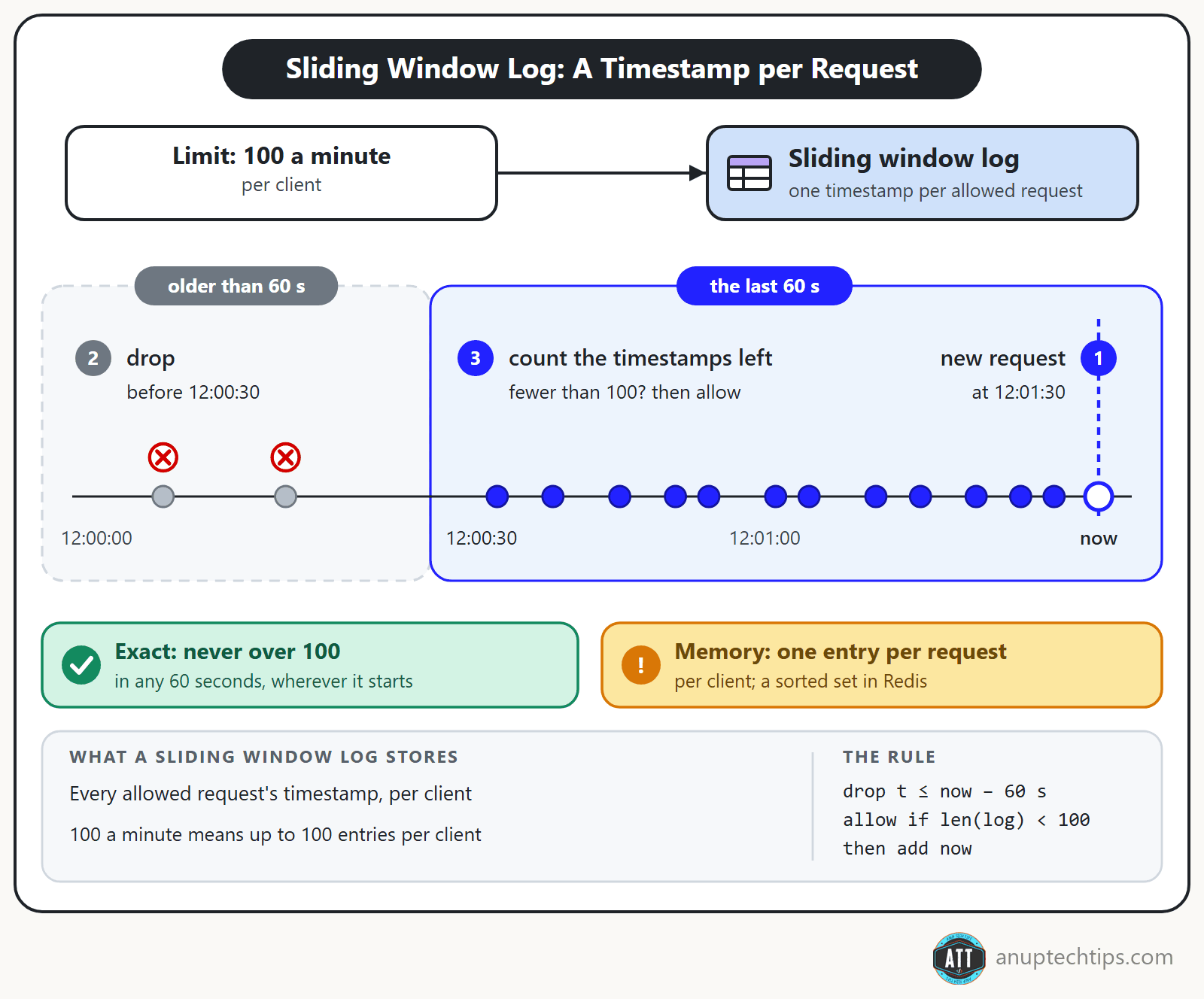
A sliding window log stores a timestamp for every accepted request, drops the ones older than 60 seconds, and allows a request if fewer than 100 remain.
It’s exact: no 60-second span ever held more than 100. The price is memory, one entry per request per key. In Redis that’s a sorted set, with a subtle bug I’ll come back to.
Sliding window counter
A sliding window counter keeps counts for the current and previous minute, and weights the previous one by how much of it still overlaps the last 60 seconds: previous * (1 - elapsed / window) + current. With 84 requests last minute and 36 so far, 15 seconds in, that’s 84 × 0.75 + 36 = 99. One more fits.
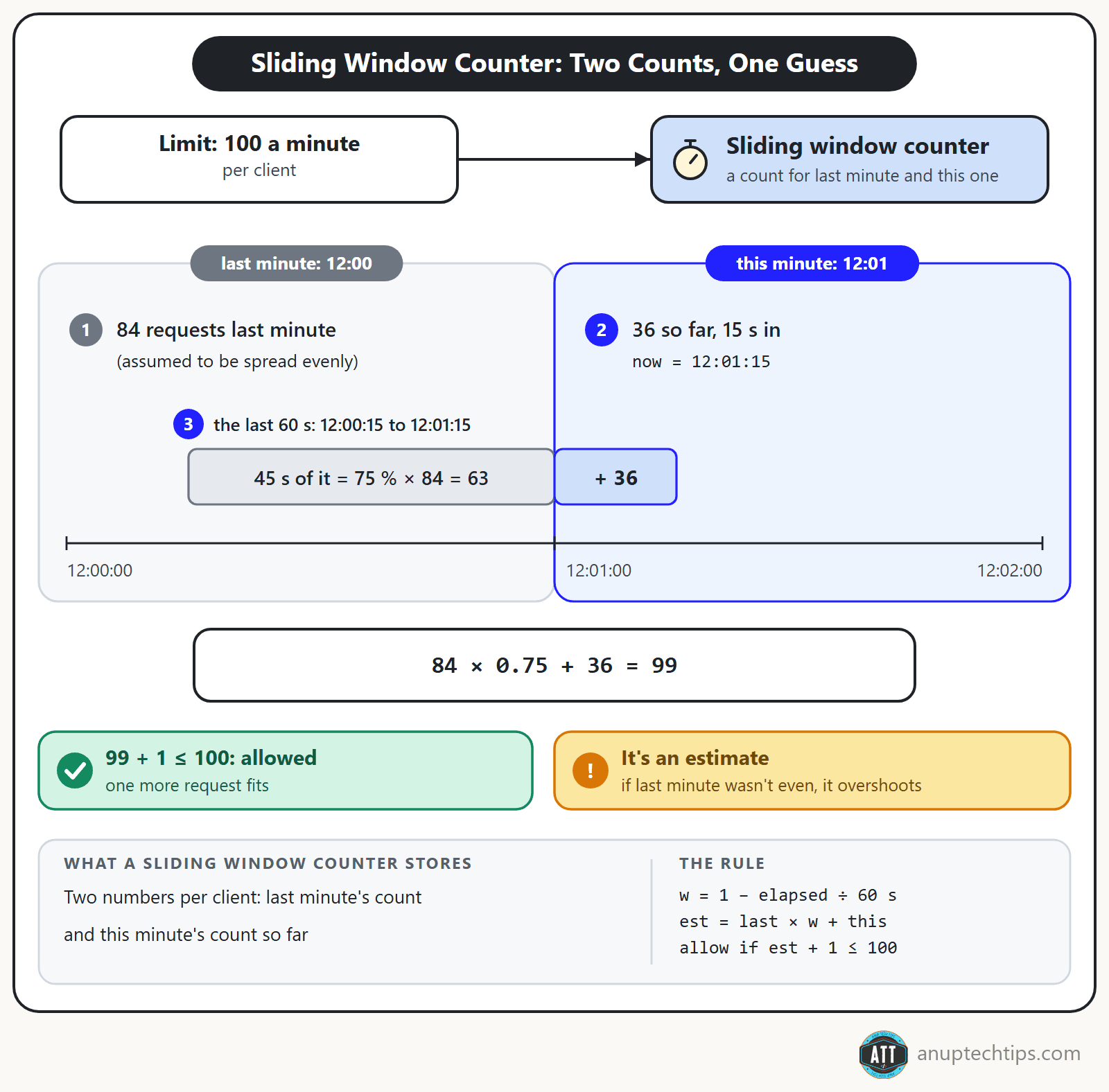
It assumes last minute’s traffic was spread evenly. Cloudflare reported only 0.003% of 400 million requests wrongly allowed or limited (2017). When the assumption breaks, it overshoots.
Token bucket (and what “burst” means)
A token bucket holds up to B tokens and refills at R per second. Each request takes one; no token, no entry. The burst is the capacity, B.
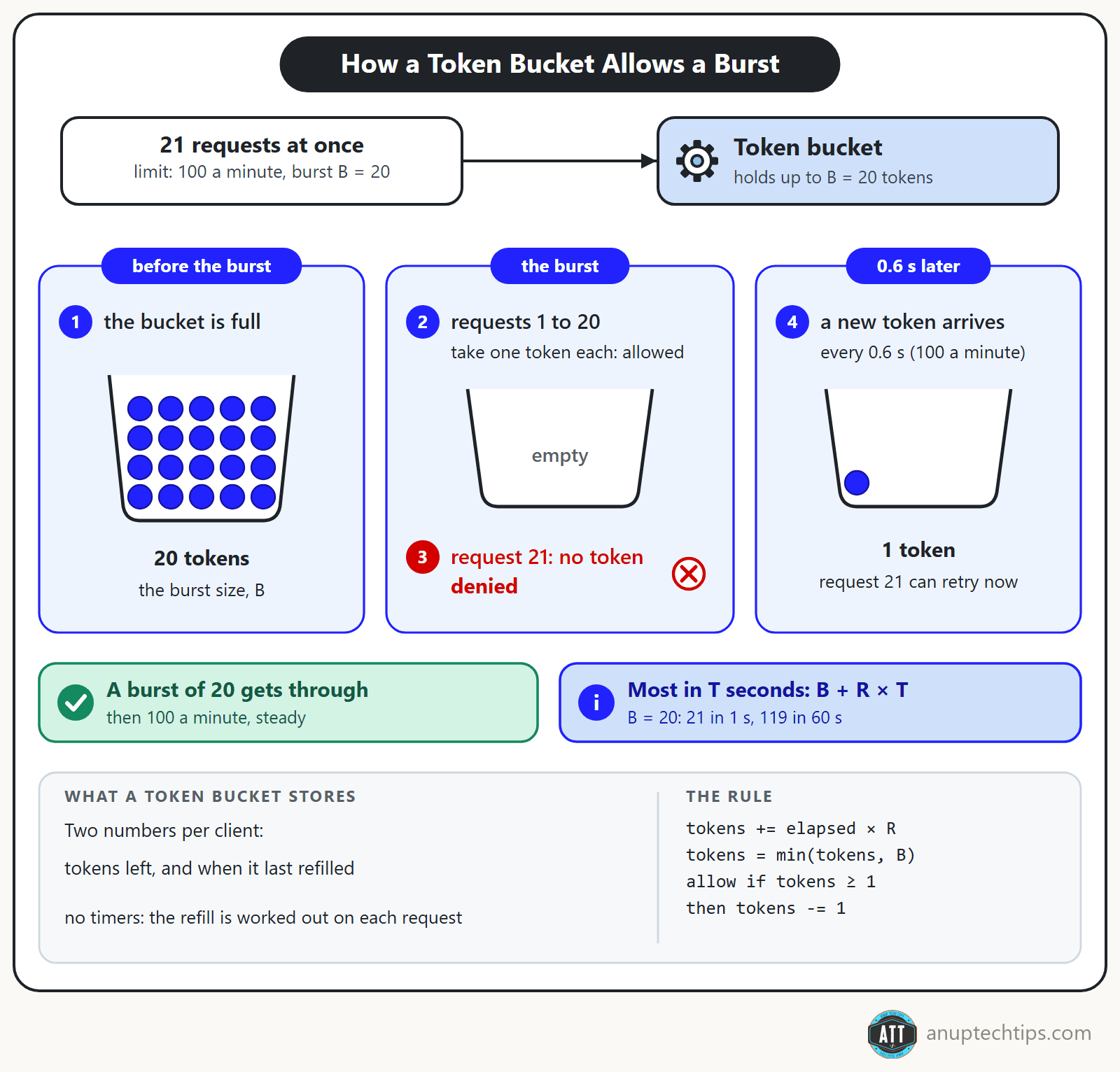
Over any T seconds a client gets at most B + R × T through. In the sim, with B = 20 that was 21 in the worst second and 119 in the worst minute; with B = 100, 199. State is two numbers, refilled lazily, no timers. It’s the workhorse: AWS API Gateway throttles with one, and its rate and burst settings are R and B.
Leaky bucket
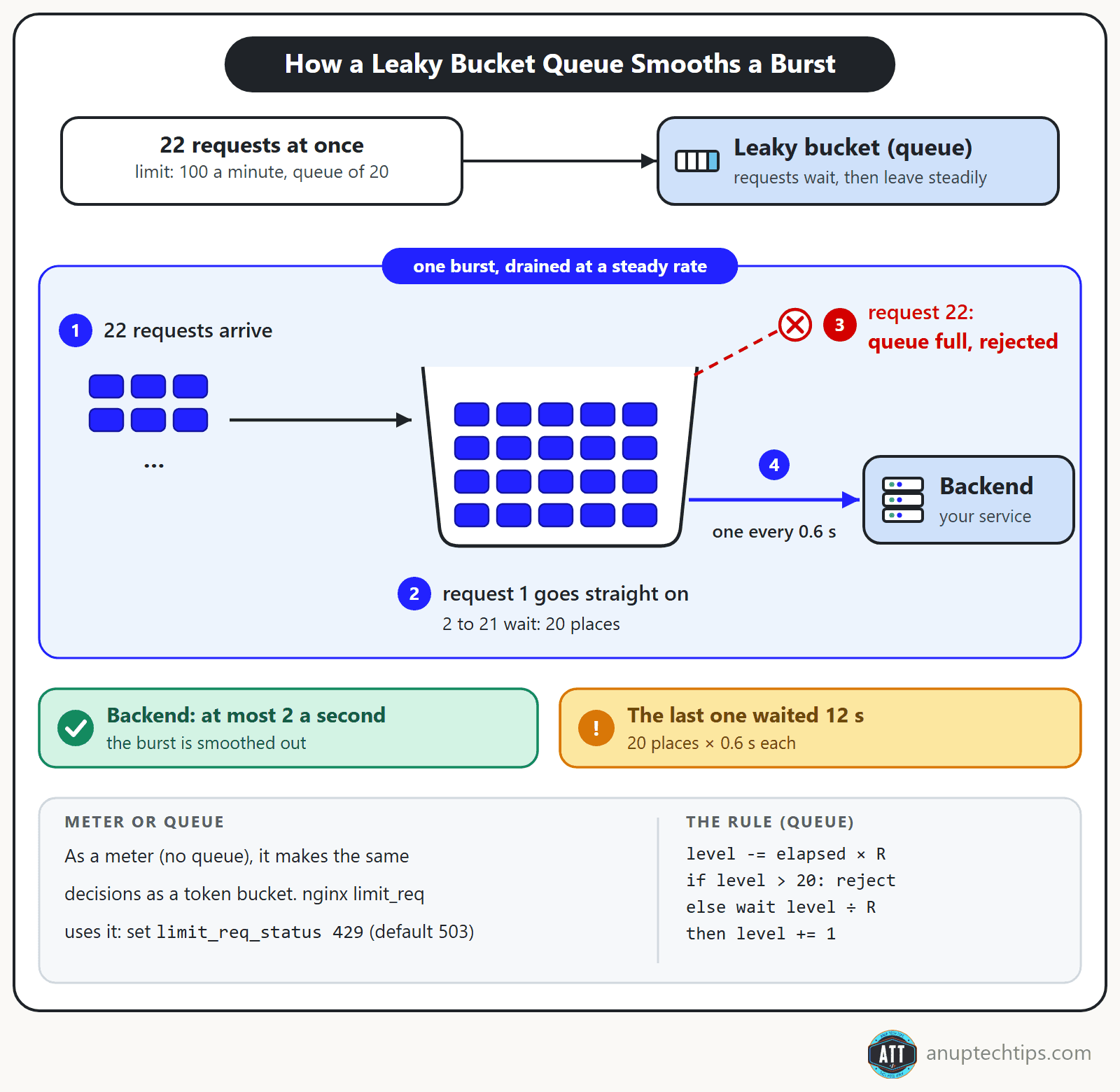
Flip the picture: requests pour into a bucket that drains at a constant rate, and overflow is rejected.
Used as a meter (reject what doesn’t fit), it makes exactly the token bucket’s decisions (the simulator compared every decision). Used as a queue (make requests wait), it smooths bursts: with a queue of 20, the backend never saw more than 2 requests in a second, but the last one waited 12 seconds. nginx’s limit_req uses the leaky bucket method and rejects with a 503 by default, so set limit_req_status 429.
GCRA: a token bucket stored as one timestamp
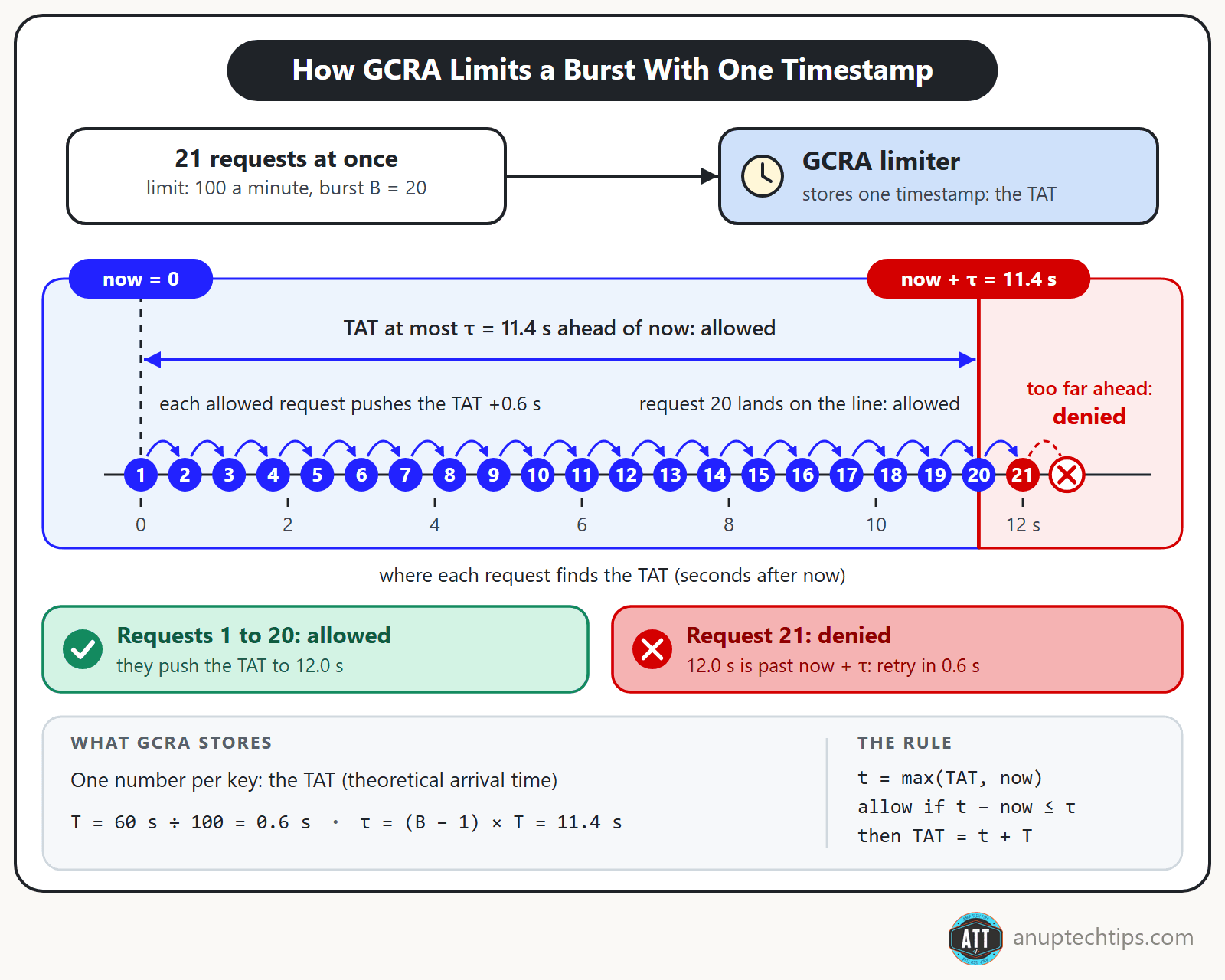
GCRA, the generic cell rate algorithm, is a token bucket that stores one number: the theoretical arrival time (TAT), when the next request is due at exactly the average rate.
At 100 a minute the interval T is 0.6 s. The tolerance τ = (B − 1) × T (11.4 s for B = 20) is how far ahead of schedule a client may run. Each allowed request pushes the TAT forward by T; a request passes while the TAT is at most τ ahead of now.
Across 132,388 simulated decisions on 23 traffic patterns, GCRA and the token bucket disagreed zero times. Let’s Encrypt moved its rate limits to Redis and GCRA in 2025, and Brandur Leach’s write-up explains it best.
| GCRA vs token bucket | Token bucket | GCRA |
|---|---|---|
| State per key | tokens + last refill time | one timestamp (TAT) |
| Allow when | tokens ≥ 1 | TAT − now ≤ τ |
| Redis key, measured | hash, 117 bytes | string, 80 bytes |
Token bucket vs sliding window: which one should you pick?
They promise different things. A token bucket promises an average rate plus a burst of B, so any minute can hold B + 100. A sliding window log promises never more than 100 in any 60 seconds; the counter tries to keep that promise with two integers, and mostly does.
The surprise: at the window edge, both sliding windows let 100 through in one second, while the token bucket with B = 20 let 21.
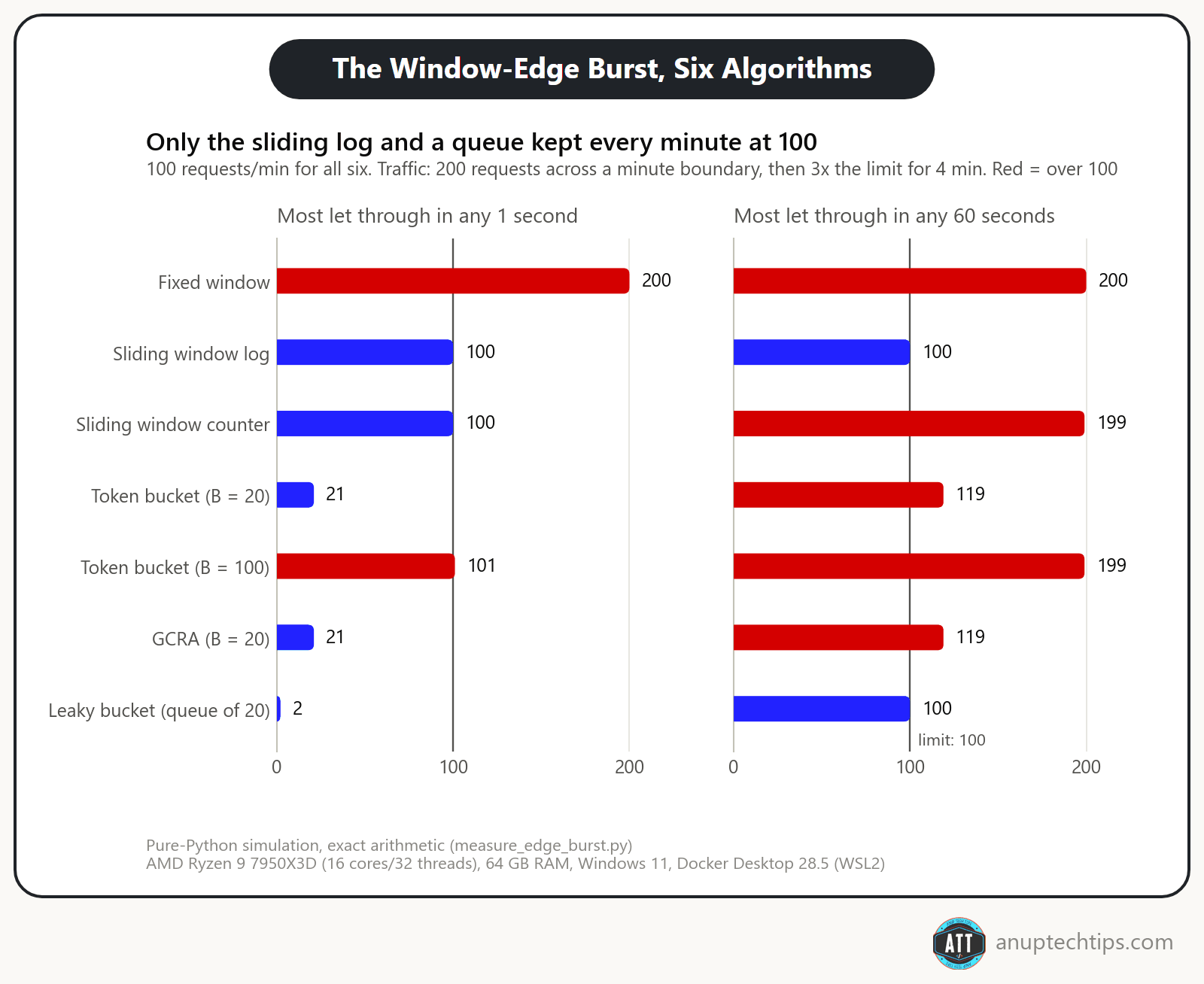
| Token bucket (B = 20) | Sliding window log | Sliding window counter | |
|---|---|---|---|
| Most in 1 s, at the edge | 21 | 100 | 100 |
| Most in 60 s, worst pattern | 119 | 100 | 199 |
| Redis memory per key | 117 bytes | 5,352 bytes | 93 bytes |
| Accuracy | exact for its R and B | exact | 1-3% wrong calls |
| Use it when | clients are bursty | the limit is a promise | keys are many, overshoot is fine |
Always say “log” or “counter”; they behave very differently.
Token bucket vs leaky bucket: serve the burst or smooth it?
Serve it with a token bucket, smooth it with a leaky bucket queue. At the same rate, the difference is request 21 of a burst: one rejects it, the other makes it wait.
| Token bucket (B = 20) | Leaky bucket (queue of 20) | |
|---|---|---|
| A burst, all at once | 20 go through, the rest get 429 | 1 goes, 20 wait, the rest are rejected |
| Added latency | none | up to 12 s |
| Output rate | up to 21 in a second | one every 0.6 s |
| State | tokens + timestamp | level + timestamp |
| Where you’ll meet it | AWS API Gateway, most APIs | nginx limit_req, outbound pacing |
In networks the same pair shapes and polices packets; in an API it paces requests. That smoothing is what most people mean by throttling: rate limiting rejects, throttling slows down, though vendors blur the two (AWS “throttling” returns 429s).
Sliding window log vs counter (and why not a fixed window)
Use the log when the limit is a promise and low enough to store every timestamp, the counter for many keys when some overshoot is fine. A fixed window only fits a calendar period.
How close? On 10,000 keys (rates 20 to 300 a minute, 5 runs of about 10.4 million requests), counting every request as Cloudflare did, the counter made the wrong call on 1.01% of requests with uniform traffic and 3.09% with bursty traffic: far above 0.003%, because every key here spends time near its limit.
Is it a hard cap? No. As the real limiter, its worst key got 118 through in one minute on uniform traffic (154 on bursty), and 4,883 of the 10,000 uniform keys went over 100 at least once.
| Fixed window | Sliding window log | Sliding window counter | |
|---|---|---|---|
| Worst 60 s, edge burst then 3× | 200 | 100 | 199 |
| Worst 60 s, random bursts (20 seeds) | 150-200 | 100 | 110-157 |
| Wrong calls vs the exact count | not measured | none | 1.01% uniform, 3.09% bursty |
| Redis structure | integer string | sorted set | small hash |
So which rate limiting algorithm is best?
None wins everywhere. A user-facing API wants a token bucket (or GCRA) with a small, deliberate burst; a promise like “five logins per 15 minutes” wants a log; a calendar quota wants a fixed window.
| Algorithm | Worst 60 s | Redis memory per key | Use it for |
|---|---|---|---|
| Fixed window | 200 | 56 bytes | Daily or monthly quotas |
| Sliding window log | 100 | 5,352 bytes | Low limits that need precision (logins, OTPs) |
| Sliding window counter | 199 | 93 bytes | High-volume limits that tolerate overshoot |
| Token bucket (B = 20) | 119 | 117 bytes | General API limits |
| GCRA (B = 20) | 119 | 80 bytes | The same, in one key |
| Leaky bucket (queue of 20) | 100 | 113 bytes | Fragile downstreams that need a steady drip |
My default: token bucket for anything user-facing, because real clients are bursty. Sliding window counter when you have millions of keys. Leaky bucket when the thing behind you needs a steady drip. (With three trusted internal callers, a concurrency limit is probably enough.) Before choosing, check:
- Which job is it: abuse, fairness, cost or a fragile dependency?
- Bursty clients? Token bucket. Steady downstream? Leaky bucket. Exact low limit? Log.
- Pick B on purpose: any minute can hold B + 100.
- Several instances? Shared, atomic state. Store down? Fail open or closed, per endpoint.
- Do rejected clients get a 429 and
Retry-After?
How do you write a rate limiter in Python?
For one process, a token bucket is about 30 lines: two numbers, a lock and a clock. It returns 0.0 when allowed, otherwise the seconds to wait, which you round up for Retry-After.
import threading
import time
from typing import Callable


class TokenBucket:
    def __init__(self, rate: float, capacity: float,
                 clock: Callable[[], float] = time.monotonic):
        self.rate = rate              # tokens added per second
        self.capacity = capacity      # biggest burst allowed
        self._clock = clock           # pass a fake clock in tests
        self._tokens = capacity       # start full
        self._last = clock()
        self._lock = threading.Lock()

    def try_acquire(self, cost: float = 1.0) -> float:
        """Return 0.0 if allowed, otherwise seconds to wait."""
        if cost > self.capacity:
            raise ValueError("cost is bigger than the bucket")
        with self._lock:
            now = self._clock()
            refill = (now - self._last) * self.rate
            self._tokens = min(self.capacity, self._tokens + refill)
            self._last = now
            if self._tokens >= cost:
                self._tokens -= cost
                return 0.0
            return (cost - self._tokens) / self.rate


bucket = TokenBucket(rate=100 / 60, capacity=20)  # 100/min, bursts of 20
time.monotonic() never goes backwards when the system clock changes, and cost lets one request spend several tokens. The clock parameter means tests never sleep. Let’s test it:
import threading

import pytest

from token_bucket import TokenBucket


class FakeClock:
    def __init__(self):
        self.now = 1000.0

    def __call__(self) -> float:
        return self.now


def test_burst_then_wait():
    clock = FakeClock()
    bucket = TokenBucket(rate=100 / 60, capacity=20, clock=clock)
    assert [bucket.try_acquire() for _ in range(20)] == [0.0] * 20
    assert bucket.try_acquire() == pytest.approx(0.6)   # one token every 0.6 s
That’s an excerpt; other tests cover the refill cap and 50 threads racing for 20 tokens (exactly 20 win). The catch: four replicas mean four buckets, and a burst meant for 20 got 80 through. Several instances need one shared count, from a library or from Redis.
Should you just use a library?
Often, yes. For FastAPI, slowapi uses limits underneath and fastapi-limiter now uses pyrate-limiter. Check the algorithms and the redis-py pin first.
| Library | Version (PyPI, 30 Sep 2026) | Algorithms | Storage | Pick it when |
|---|---|---|---|---|
| slowapi | 0.1.10 | those in limits | through limits | decorator limits on FastAPI |
| limits | 5.8.0 | fixed window, moving window (a log), sliding window counter | memory, Redis, Valkey, Memcached, MongoDB | your own middleware |
| fastapi-limiter | 0.2.0 | those in pyrate-limiter | through pyrate-limiter | Depends()-style limits |
| pyrate-limiter | 4.5.0 | sliding window log (default), fixed window, GCRA/token bucket | memory, Redis, Postgres, file lock | GCRA off the shelf |
| aiolimiter | 1.3.0 | leaky bucket | in-process (asyncio) | pacing outbound calls |
Gotchas: limits[redis] requires redis<8.0.0 while redis-py is at 8.1.0 (the rediscluster extra has no cap), slowapi’s own redis extra pins redis<4.0.0, and memory:// storage is per process. limits has no token bucket or GCRA, a fair reason to write the Lua yourself.
Distributed rate limiting with Redis
Redis is the usual home for shared limiter state: it’s fast, keys expire on their own, and INCR is atomic. But atomic commands don’t make your algorithm atomic.
The race you’ll write first
The naive version reads the count, checks it in Python, then writes:
def naive_fixed_window(r: redis.Redis, key: str, limit: int = LIMIT, window: int = WINDOW) -> bool:
    """The race you'll write first. Don't use it."""
    count = int(r.get(key) or 0)          # 1. read
    if count >= limit:                    # 2. decide in Python
        return False
    if r.incr(key) == 1:                  # 3. write: others may have written since 1.
        r.expire(key, window)             #    and a crash here leaves no TTL
    return True
Two servers both read 99, and both let a request through.
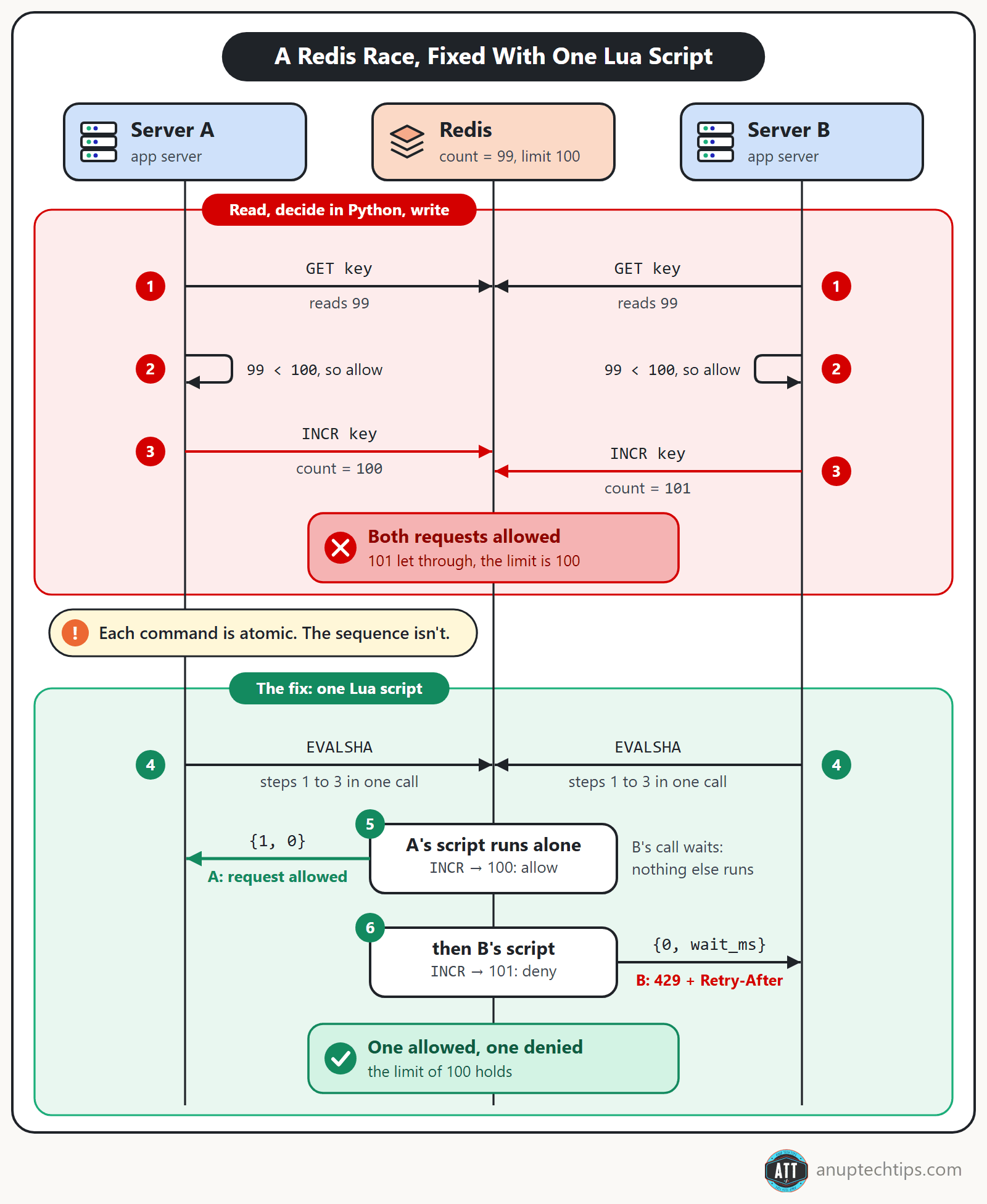
With 20 threads sending 25 requests each at once against a limit of 100, it let 109 through (median of 20 runs, 106 to 115); MULTI/EXEC and Lua let exactly 100. And if the process dies between INCR and EXPIRE, the key never expires. You don’t need a lock (see Redis distributed locks for when you do), just one atomic step.
Make it atomic: a Lua script, or a Redis Function
Redis runs a Lua script atomically: no other command runs meanwhile. Here’s the token bucket:
-- ARGV: rate (tokens/sec), capacity, cost
local rate = tonumber(ARGV[1])
local capacity = tonumber(ARGV[2])
local cost = tonumber(ARGV[3])
if cost > capacity then
  return {0, -1}  -- can never fit: say so instead of asking the caller to wait
end

local t = redis.call('TIME')
local now = tonumber(t[1]) + tonumber(t[2]) / 1000000

local state = redis.call('HMGET', KEYS[1], 'tokens', 'ts')
local tokens = tonumber(state[1]) or capacity
local ts = tonumber(state[2]) or now

tokens = math.min(capacity, tokens + math.max(0, now - ts) * rate)

local allowed, wait_ms = 0, 0
if tokens >= cost then
  tokens = tokens - cost
  allowed = 1
else
  wait_ms = math.ceil((cost - tokens) / rate * 1000)
end

redis.call('HSET', KEYS[1], 'tokens', tokens, 'ts', now)
redis.call('EXPIRE', KEYS[1], math.ceil(capacity / rate) + 1)
return {allowed, wait_ms}
Keys arrive through KEYS, which Redis Cluster needs. The TTL covers a full refill, since an expired key and a full bucket mean the same thing. It returns milliseconds because Redis turns a Lua number into an integer by dropping the decimals: a 0.59-second wait would arrive as 0.
GCRA is 12 lines:
-- ARGV: emission interval T (sec per request), burst B
local T = tonumber(ARGV[1])
local tau = (tonumber(ARGV[2]) - 1) * T        -- how far ahead a client may run
local t = redis.call('TIME')
local now = tonumber(t[1]) + tonumber(t[2]) / 1000000

local tat = math.max(tonumber(redis.call('GET', KEYS[1])) or now, now)
if tat - now > tau then
  return {0, math.ceil((tat - tau - now) * 1000)}   -- denied: wait this many ms
end
redis.call('SET', KEYS[1], tat + T, 'PX', math.ceil((tat + T - now) * 1000))
return {1, 0}
Call either by hash with EVALSHA. The script cache isn’t persistent; redis-py’s register_script() reloads after a NOSCRIPT error (a repo test forces one). On Redis 7+, Redis Functions supersede EVAL: load a named library once, Redis persists and replicates it, and FCALL calls it by name. The repo wraps the same six scripts in redis.register_function unchanged. On a cluster, load the library on every node yourself; Redis won’t.
Whose clock is it?
The script uses Redis’s clock, not the caller’s. Twenty app servers mean twenty drifting clocks, and one running behind makes elapsed time negative (hence math.max), then hands out refills that never happened. Since Redis 5.0, scripts replicate their effects rather than re-running on replicas, so TIME in a script that writes is safe.
What each algorithm costs in Redis
Memory per key from MEMORY USAGE, at full state for 100 a minute:
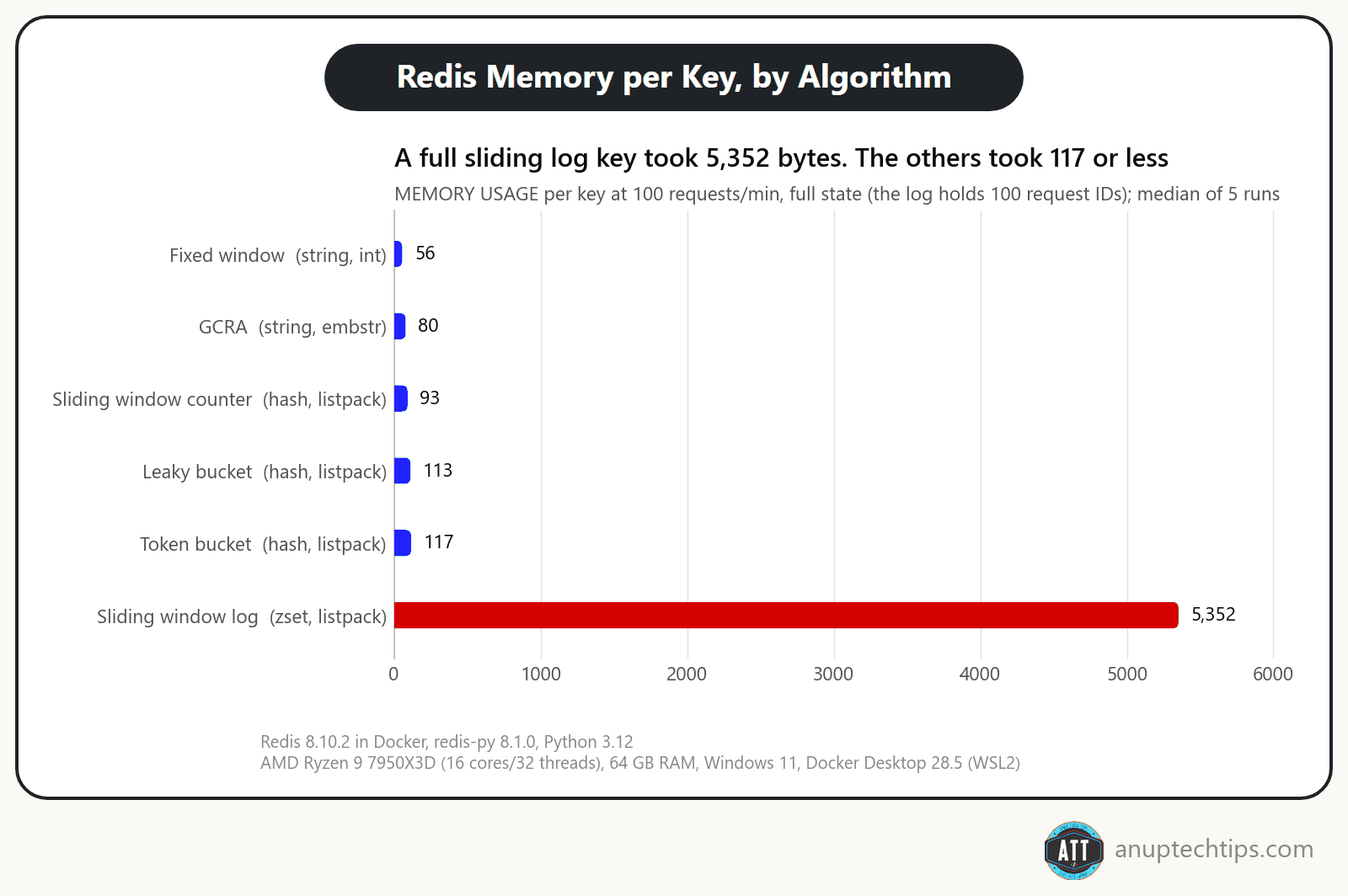
At 1,000 a minute the log leaves the compact listpack encoding for a skiplist: 110,360 bytes a key. Time per decision, one client in sequence (medians of 20 runs of 2,000 calls):
| Variant | p50 | p99 |
|---|---|---|
| Naive GET + INCR (2 round trips) | 842.5 µs | 1,460.9 µs |
| MULTI/EXEC fixed window | 409.2 µs | 630.5 µs |
| EVALSHA, all six scripts | 404.9-416.4 µs | 614.6-644.4 µs |
| FCALL, all six functions | 401.4-418.4 µs | 611.0-651.2 µs |
On an AMD Ryzen 9 7950X3D (16 cores/32 threads), 64 GB RAM, Windows 11, Docker Desktop 28.5 (WSL2), every atomic version took about 0.4 ms whatever the algorithm, and FCALL vs EVALSHA was noise. Most of that is Docker Desktop’s network hop, so yours will differ. Choose the algorithm for its behavior, not its speed.
Fail open or fail closed?
- Fail open: allow traffic. Availability wins and protection vanishes. Envoy’s rate limit filter does this by default; with
failure_mode_denyit rejects with a 500, not a 429. - Fail closed: reject traffic. Protection wins, and a Redis blip becomes an outage.
Choose per endpoint: open for cheap reads, closed for logins and anything that spends money. The repo’s FastAPI app does that; its closed route answers 503, not 429, since the client did nothing wrong. Keep the Redis timeout tight (50 ms there) and add a circuit breaker: a slow limiter is worse than none. Better still, fall back to an in-process bucket holding each instance’s share of the limit.
Where should the limit live, and what should it count?
In layers, each keyed on the most specific identity it has.
- Edge or CDN: blunt per-IP limits that stop floods early.
- API gateway: per-key, per-tenant and per-route limits after authentication (see LLM gateway architecture).
- Inside the service: limits that need business context, like exports per user.
Per-IP is all you have for anonymous traffic, but an office shares one IP behind NAT and one IPv6 client can rotate through a /64, so key on the prefix. Never trust the leftmost X-Forwarded-For entry. Per-user and per-tenant keys are fairer.
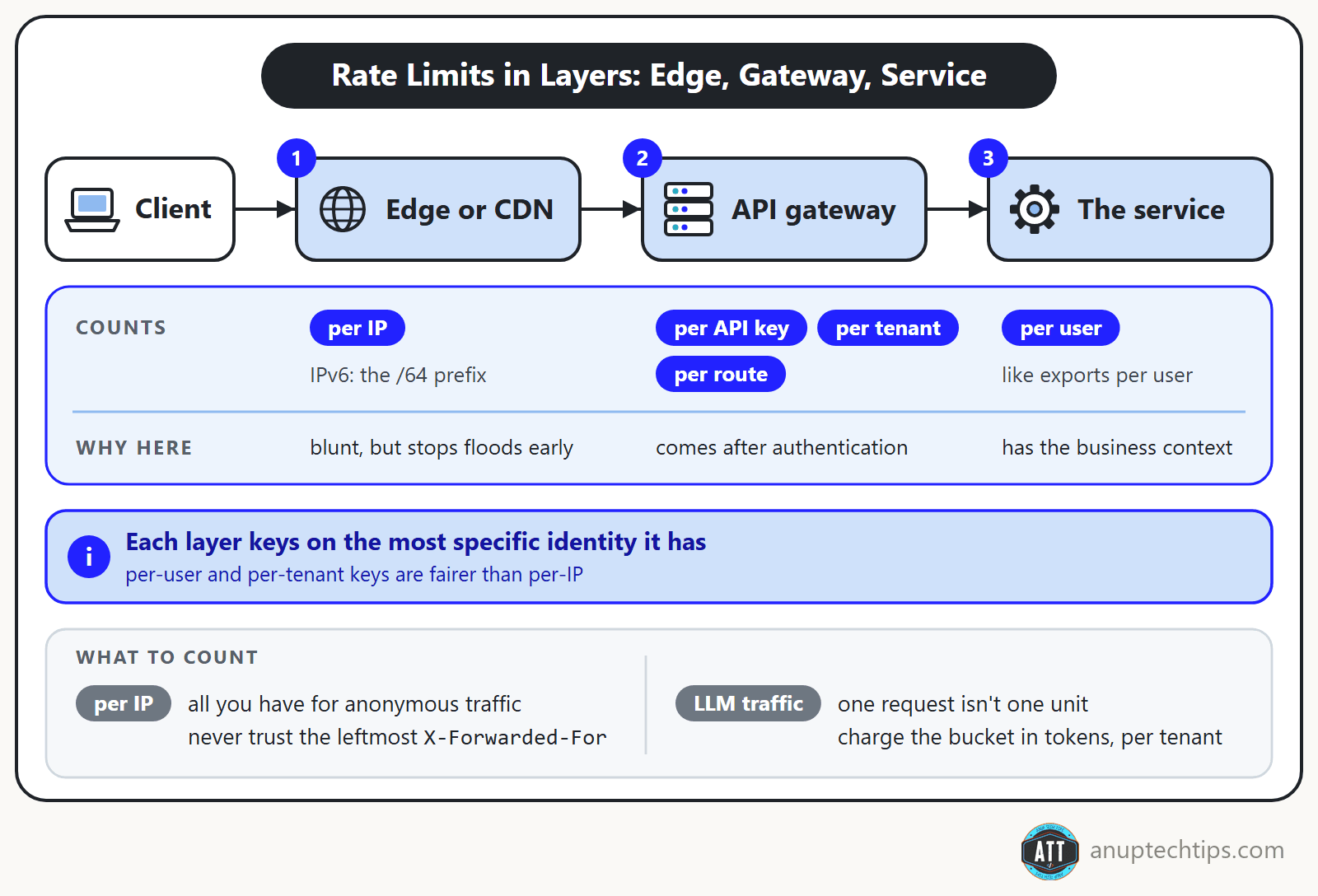
LLM traffic: one request isn’t one unit
Request counts mean little for LLM traffic: one call carries a 50-token question, the next a 100,000-token document, and both count as one request. That’s what cost is for: charge the bucket in tokens and it becomes a weighted limiter. A token bucket per tenant, next to the per-request one, stops one tenant’s huge prompts from draining everyone’s quota.
Providers do the same. OpenAI limits requests and tokens per minute (RPM, TPM); Anthropic splits tokens into input and output (RPM, ITPM, OTPM) and says its API uses a token bucket, so capacity refills continuously instead of resetting each minute, just like the Lua script above. Reserving and reconciling tokens get their own post: token-based rate limiting for LLM APIs.
Why Cursor and GitHub Copilot stopped counting requests
Both priced by the request, and both gave it up. Cursor dropped request-based pricing on 16 June 2025: new models can spend more tokens per request on longer tasks, it said, and the hardest requests cost “an order of magnitude more” than simple ones. On 4 July it apologized for the rollout and offered refunds. GitHub Copilot followed on 1 June 2026. GitHub’s reason: a quick chat question could cost a user as much as an autonomous coding session lasting hours. Its old rules counted only the prompts you sent, never an agent’s own tool calls (GitHub Docs), so an agent working for hours on one prompt was one premium request, times the model’s multiplier.
| Cursor Pro | GitHub Copilot Pro | |
|---|---|---|
| Before | 500 requests a month, a Sonnet request counting as 2 | 300 premium requests a month, each charged at the model’s multiplier |
| After | $20 of included usage a month at API-based prices (about 225 Sonnet 4 or 650 GPT-4.1 requests in July 2025) | $10 of AI Credits a month, from input, output and cached tokens at API rates |
In this post’s terms, a request limit is try_acquire() at the default cost of 1, a multiplier is a fixed cost per model (better, but blind to a session that runs for hours), and both companies moved to charging what the tokens cost. The monthly allowance is a fixed-window quota counted in dollars.
For your own gateway I’d keep such a quota and add the per-tenant token bucket from above, charged in tokens: no tenant burns more than B + R × T tokens in T seconds. Size B for your biggest allowed request. A cost bigger than the bucket can never fit, however long it waits, so TokenBucket raises ValueError and the Lua script returns a wait of -1: answer that with a 413 or a clear error, not a Retry-After that will never come true.
What should a client see when it hits the limit?
A 429 Too Many Requests (RFC 6585) with Retry-After in whole seconds (RFC 9110); save 503 for a service-wide overload. The repo’s FastAPI dependency sent this on request 21:
HTTP/1.1 429 Too Many Requests
retry-after: 1
ratelimit-policy: "per-key";q=100;w=60
ratelimit: "per-key";r=0;t=1
content-length: 30
content-type: application/json

{"detail":"Too Many Requests"}
Retry-After is 1 because the next token is never more than 0.6 s away. Round up, never down.
Vendor headers differ: GitHub’s x-ratelimit-reset is epoch seconds, Anthropic’s are RFC 3339 timestamps. The IETF, the group that writes internet standards such as HTTP, has proposed standard RateLimit header fields, but they’re still a draft: version -11, which expires on 24 November 2026, not a finished standard (an RFC). RateLimit-Policy carries q (quota), qu (unit), w (window) and pk (partition key); RateLimit carries r (remaining) and t (seconds to reset).
Clients should honor Retry-After, retry with backoff and jitter and cap retries, and make retried requests safe with idempotency keys.
Twitter’s read limits and the web app that kept retrying
Back to that weekend. Within hours, Twitter raised the limits twice, ending at 1,000 posts a day for unverified accounts and 10,000 for verified ones, while users hit “rate limit exceeded” errors (TechCrunch). Developer Sheldon Chang recorded the browser’s network panel filling with failed requests as the web app kept asking, about 10 times a second (The Register). Twitter didn’t publish a root cause, so I won’t guess whether the loop helped bring on the limits or came from them.
Each piece of that weekend has an answer in this post:
| Twitter, July 2023 (as reported) | This post |
|---|---|
| Limits on every account at once, changed twice within hours | Run new limits log-only first (the checklist below) |
| A web app asking again about 10 times a second | A 429 with Retry-After, and clients that honor it, back off with jitter and cap retries |
| Every retry landing on Twitter’s servers | A per-key token bucket (B = 20) lets one request through every 0.6 s after the burst and turns the other 500 a minute away, one Lua call each (about 0.4 ms in the benchmark above) |
Paul Tarjan’s 2017 post on how Stripe scales its API with rate limiters is the calm version of the same story. Its most important limiter is a token bucket in Redis, which rejected millions of requests in one month, especially from test-mode scripts that had gotten out of hand. And its advice reads like fixes for that weekend: dark-launch each limiter to see what it would block, keep kill switches, and fail open if the limiter or Redis breaks. On that last one I’d still choose per endpoint, as in the fail-open section.
Before you ship: five mistakes worth checking
- Per-process limits behind a load balancer. Your limit multiplies by the replica count.
- A burst as big as the limit. B = 100 at 100 a minute let 199 through in one minute.
- The sliding log’s subtle bug: timestamps as sorted set members.
ZADDwith an existing member only updates its score, so same-millisecond requests count once. Append a request ID. - A bare 429. Without
Retry-After, clients guess, often “immediately”. - Enforcing new limits on day one. Run them log-only first. Sometimes the one you’d block is your best customer.
Then load-test the real endpoint, not just the algorithm. A tool like k6 or Locust (Locust tests are plain Python) can send three times your limit and show what clients actually get: a 429 with a Retry-After, and how much the limiter adds to every request.
Over to you: which algorithm runs in your production stack, and did you choose it or inherit it from the gateway? How do you handle fail open versus fail closed? Tell me in the comments.
The simulator, Lua scripts and tests are on GitHub. Found a pattern that breaks one? Send a PR. Next in this series: the transactional outbox pattern in Python, and the newsletter brings it to your inbox.